


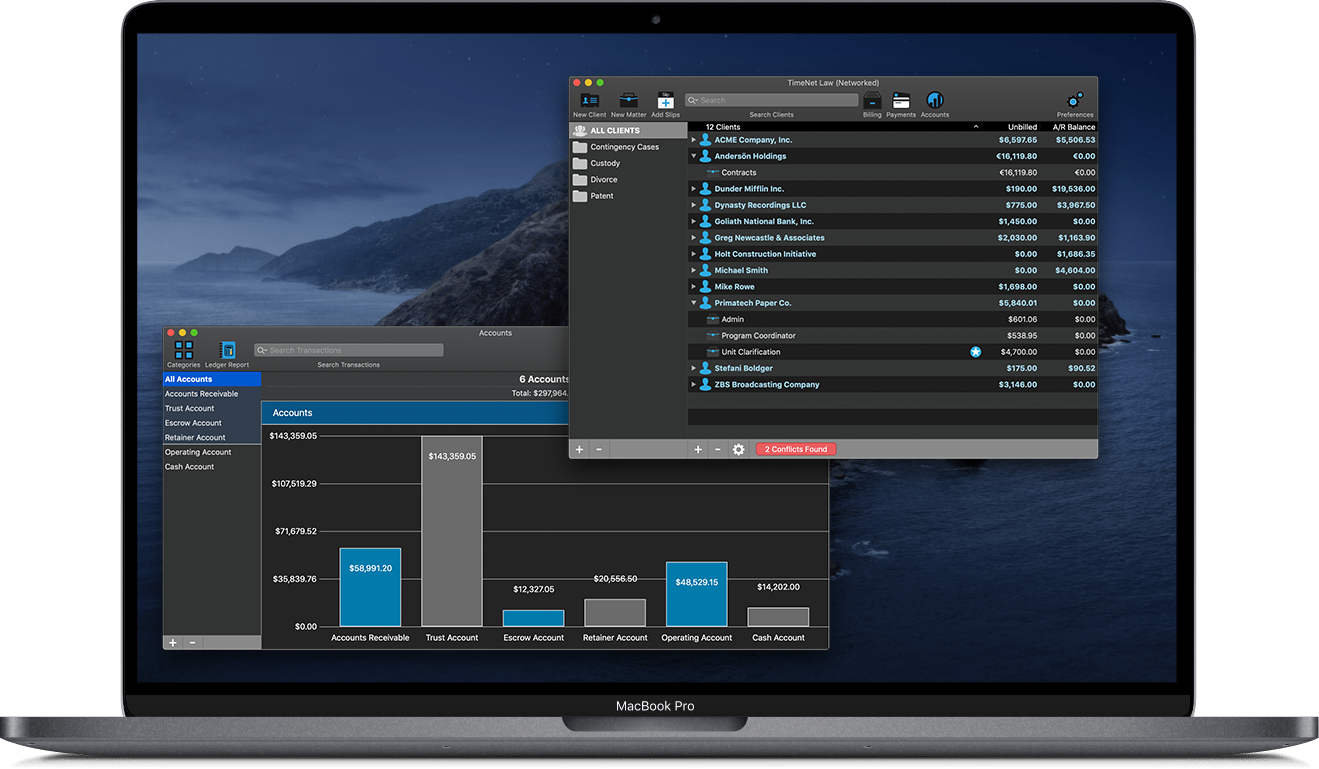
Working Remotely with TimeNet Law
TimeNet Law makes it incredibly easy to allow you and your team to work from home. You do not have to purchase extra licenses to run TimeNet Law remotely on additional computers. You only need one license per user.
We've made a very simple guide to help assist in getting TimeNet Law configured for remote use. Just follow the instructions for Cloud Mode here.
 Increase Your Billable Hours — Guaranteed!
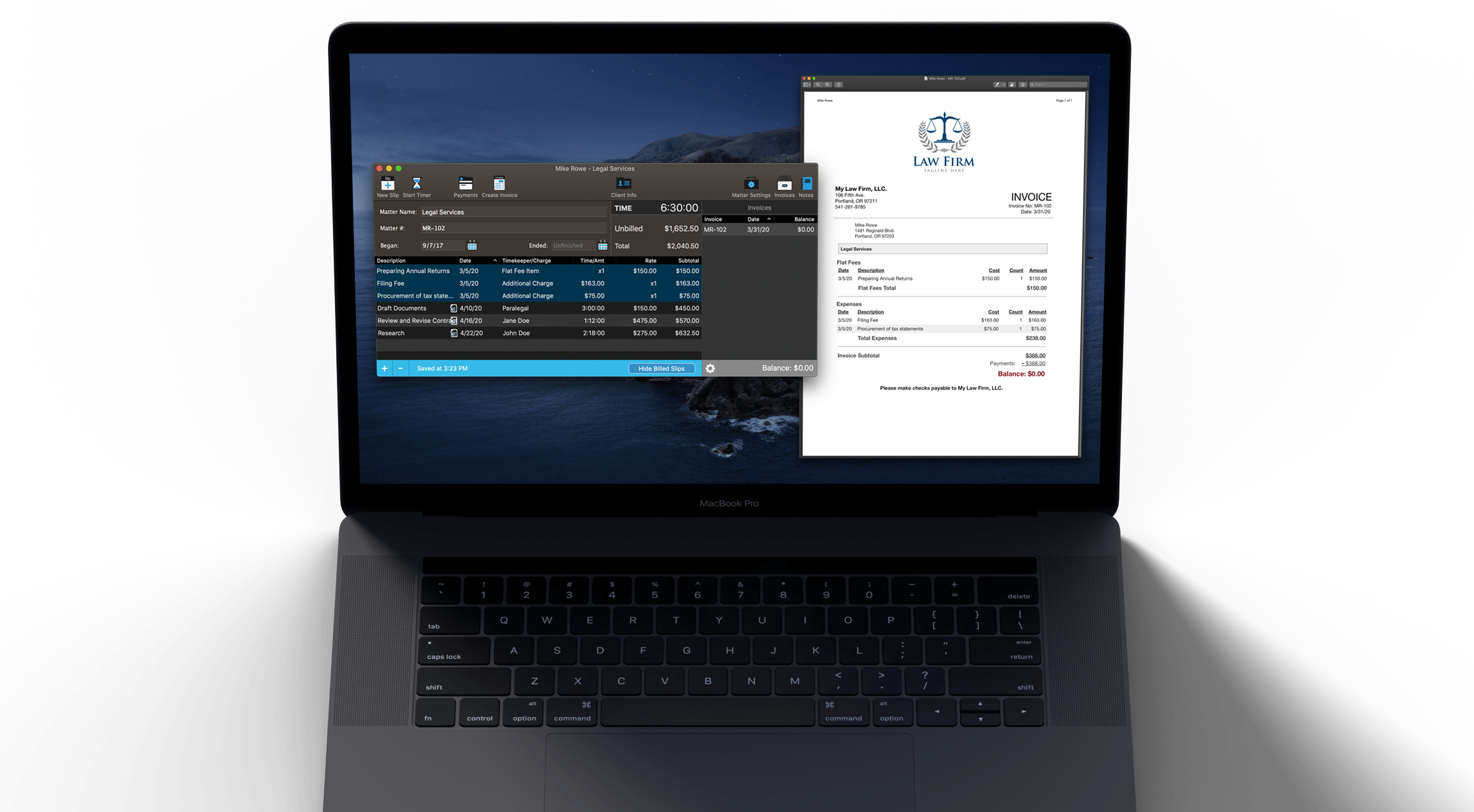
No one likes time tracking. But TimeNet Law has been built to be quick, easy, even fun to use. Entering time is fast, and a built in timer with smart rounding and prompting makes it easy to track as you go, instead of filling in the blanks later.
We guarantee that once you start tracking your time with TimeNet Law, you will capture more of it. No more lost revenue.
 Drastically Reduce the Time You Spend Invoicing
Time spent billing is time not working. TimeNet Law's One Click Billing feature turns all your time and expenses into beautiful invoices in seconds. Evergreen retainers are managed automatically, and invoices can be printed or emailed all at once.
What used to take hours, now takes minutes. Literally. So you can get your bills out the door fast and get back to work.
Ready to Take Your Law Firm to the Next Level?
Tracking time & expenses is a snap. One Click Billing and Automatic Bookkeeper automate the tedious task of billing. You will save time and capture more billable hours. But TimeNet Law can do a lot more than just that.
Time is Money — Make it Count
Make more money by billing for every minute. Start a timer from anywhere. Pause a timer and time can be automatically rounded. Resume a timer and it starts from the actual time, not the rounded time. Walk away from the computer and TimeNet Law offers to deduct your idle time. Simple.
- Control the timer with the global menubar or Dock icon
- System-wide keyboard shortcuts
- Automatic Rounding
- Idle Time Detection
- Track billable and non-billable time — both are important!
Turbo Charge Your Firm
Everything you need to manage your clients and matters. Group clients together for organization and reporting, make clients and matters inactive to reduce clutter, and QuickSearch everything to find what you need instantly. Easy.
- Full case management with matters
- Payment and retainer audit trails
- Track parties by client and matter, with automatic Conflict of Interest checks
- Evergreen retainers
- Automatic accounting
- Automatic Conflict of Interest checks
- No more embarrassing and potentially costly mistakes
- No more billable time slipping through the cracks
Bill Your Clients With Ease
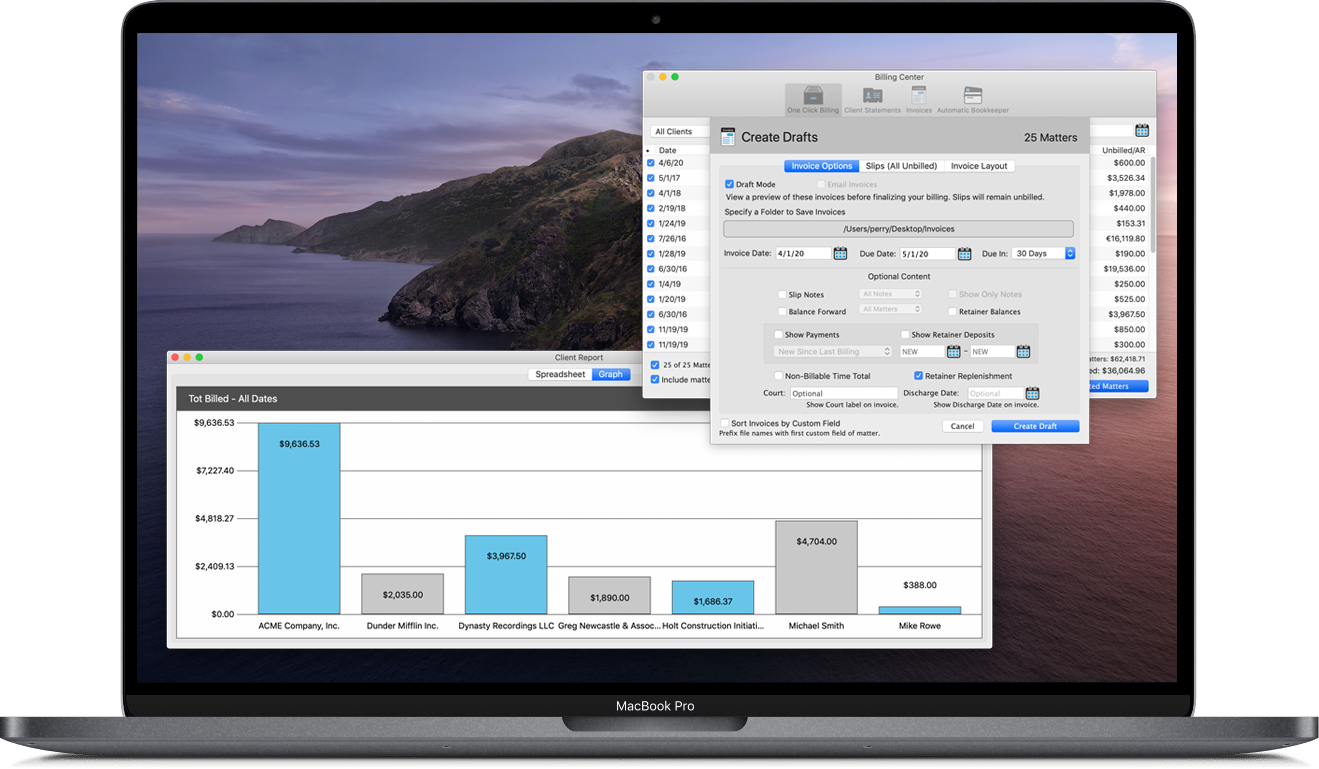
One Click Billing transforms all of your matters into beautiful, consistent invoices. Set date filters to only invoice work from a specific month, and even filter by timekeeper and slip type.
Put a Billing Hold on clients or matters to exclude them from One Click Billing.
One Click Billing can also create statements for clients showing all outstanding invoices and the balance due, on one clean sheet.
One Click Billing can even apply any funds from client retainers to the balance automatically, showing the payment and remaining balance on the invoice.
The tedious task of billing just got a whole lot easier.
- One click, instant invoice
- Automatic Bookkeeper handles retainer payments for you
- Include clients with no new activity but an outsanding balance
- Invoices can be automatically emailed to clients
Increase Revenue with Intelligent Analytics
Flexible reports with beautiful graphs let you quickly see vital information about your firm.
- See which clients owe you money, and which clients are most profitable
- See all overdue invoices, and take action with one click
- Compare entry dates vs. billed dates to see turnaround time and always know if something slips through the cracks
The Client Report, Aged A/R Report, and Aged Work in Progress Report make it easy to find the information you need quickly.
- See which client has the highest and/or oldest unpaid balance
- See which client has the most write offs or mark downs
- See which clients you’re most financially invested in
- See which matters are over budget, or getting close
- See which billable work has not been billed yet, broken down by age. Always know if billing falls behind
The Timekeeper Report gives you insights into your timekeepers, broken down by client, by matter, and for any date range.
- Timekeeper billable time, non-billable time, and amounts
- Timekeeper productivity & revenue
- Timekeeper origination - know how many clients each timekeeper has brought to your firm
Manage Clients with Flexibility
Different clients have different needs. Set custom billing rates, retainer requirements, tax rules, and currency settings. TimeNet Law handles foreign currencies and numeric formats as well, so you can take your billing international.
- Import clients from Contacts on your Mac or iPhone
- Group clients together for easy management
- Customize billing, retainers, tax, and currency rules
- Manage unlimited parties associated with each client
- Conflict of Interest checks are automatically performed
Networking Done Right
Share your data through your office network, or get the benefits of anywhere-access with Dropbox, iCloud, and many other cloud sync services. No extra software to buy, 30 seconds to set up. And you have complete control.
Want cloud convenience? You got it.
TimeNet Law integrates with Dropbox, iCloud, OneDrive, and many other cloud sync services. Work from home, work from the office, work from anywhere. With anyone. Always synced.
Important Questions to Consider with Cloud Based Software
What if I want/need to work and I don't have internet access?
TimeNet Law lets you work away, even away from the internet.
What if there is a service outage and I need access to my client data now?
With TimeNet Law, your data is always on your hard drive. Even when using Cloud Mode and remote access.
What if the company storing my data goes out of business or is otherwise not accessible?
TimeNet Law isn't going anywhere, but even if it did, you own the data and the application forever.
How do I backup my data, and most importantly, will I be able to access it outside of using their website?
You get the idea.
You can track your work without internet access. As soon as you're connected again, everything syncs automatically. Your data is on your drive, is easy to backup and always accessible.
Don't want cloud? No problem.
TimeNet Law also supports sharing data through a local network or shared folder, so you can work in an office without needing to store your data with any third parties. Complete privacy.
Made Just for Your Mac
TimeNet Law is an application that lives on your Mac. Because it isn't a web app, you get great functionality like power-user keyboard shortcuts, full access even without an internet connection, and native support for all of the great macOS technologies built-in to your computer. TimeNet Law was designed for your Mac, and it shows.
- Sync with Contacts & Calendar
- Automatic backup with Time Machine
- Control timers from the Dock or menubar
- Beautiful Retina interface that looks great on your Mac
Questions? Give us a call.
541-261-9785
Talk to a real person. No menu, no hold, no problem.
Support is our number one priority. That's why so many attorneys trust TimeNet Law. We will always answer questions, resolve issues, and add new features to make sure TimeNet Law is working great for your firm.
Attorneys Love TimeNet Law

Mark W. Breneman — Breneman Law, PLLC"We find that TimeNet Law has reduced our twice-monthly billing time from several hours to several minutes compared to Amicus, and I think Amicus was already a great improvement over previous applications. TimeNet Law is making us money by improving our efficiency."
Recommended By



TimeNet Law Academy
See TimeNet Law in action and learn about advanced features with our Video Library.

TimeNet Law Pricing
Limited Time Sale
Basic
Core Features for Everyone
ON SALE! $299
+ $279 $229 per additional user
NO MONTHLY FEES
- Case Management
- Track Time & Expenses
- One Click Billing
- Unlimited Entries
- Flexible Invoicing
Complete
Core + Accounting + Reporting
ON SALE! $599
+ $279 $229 per additional user
NO MONTHLY FEES
- All Basic Features
- Accounting Module
- Client Payments & Retainers
- Automatic Bookkeeper
- Internal Accounts & Ledgers
- Reporting Module
- Over 20 Powerful Reports
- Create Your Own Presets
Most Popular
Gold
All the Bells and Whistles
ON SALE! $899
+ $279 $229 per additional user
NO MONTHLY FEES
- All Complete Features
- LEDES & Task Codes Module
- LEDES98B Invoicing
- UTBMS Code Sets
- Control Center Module
- User Permission Control
- Audit All Entries & Changes



Need to Order Something Else?
Renew Existing Licenses
Purchase Additional Licenses
Purchase Additional Modules
Frequently Asked Questions
Can I purchase one package and upgrade to another later?
Absolutely. You can add on any modules you need at any time.
How do renewals work?
There are no monthly fees to use TimeNet Law. After purchase, the software is yours to keep forever, and you get one year of free updates and priority phone support. For another year of updates and priority phone support, simply renew your license at any time.
Can I get a discount on bulk additional licenses or renewals?
You bet. Discounts are automatically applied when you make your order.
Do you offer a money back guarantee?
Of course. We offer a 90 day no hassle money back guarantee.
Happy Customers
TimeNet Law is loved by thousands of professionals all over the world. See what just a few of our happy customers have to say.
Mark W. Breneman, — Breneman Law, PLLC"We find that Timenet Law has reduced our twice-monthly billing time from several hours to several minutes compared to Amicus, and I think Amicus was already a great improvement over previous applications.
TimeNet Law is making us money by improving our efficiency."

Joel Silverman — Silverman Law Office"A big selling point for our purchase of TimeNet Law for the Mac was the support available. Perry has been fantastic in helping us get the program up and running in our office, as well as making program changes to accommodate our firm’s specific needs. Being able to get a response in short order is critical for our business. We would recommend this billing software for any law firm."

Kacey Miller — Courtroom Logic Consulting"We currently use TimeNet Law and LOVE it! I especially like the easy (and pretty) interface, the desktop timer, the ability to "no charge" an item (but still have it show on the invoice so clients see the value of what you're giving them), and the ability to have multiple timekeepers at multiple rates.
The developer is extremely responsive and open to suggestions. Great support!"
Frequently Asked Questions
What are TimeNet Law's system requirements?
TimeNet Law 3 runs on any Mac with macOS 10.9 or later. TimeNet Law 2.9 is still available, and runs on any Mac with macOS 10.4 or later.
Do I have to be online to use TimeNet Law?
No. TimeNet Law is an application that lives on your Mac. You can use it with or without internet access. All data is stored locally, unless you sync your database with a cloud service.
How does TimeNet Law's networking work?
TimeNet Law's database can be shared through a file sharing server or a shared folder. For remote access or larger teams, your database can be synced with Dropbox, OneDrive, and many other free cloud syncing services.
TimeNet Law does not need to be installed on a server computer, so there is no server license to buy. Simply tell TimeNet Law to work on a network, select the location for its database, and all copies of TimeNet Law will be automatically synced.
Is TimeNet Law a one-time fee?
Yes, TimeNet Law is a one-time fee! We do not charge monthly fees, and you'll get free updates and priority support for one year. When the year is up, you can renew your license for another year of updates and priority support, or you can continue to use your old version — it's yours to keep forever.
Any modules purchased for your firm only need to be purchased once, and will be available to all copies of TimeNet Law running on your network.